Untitled from Rustled Jimmies on Vimeo.
Monday, 16 April 2012

Friday, 27 January 2012
Thursday, 26 January 2012
Thursday, 12 January 2012
Digipak and Advert feedback
According to the feedback we received our page design was well done. It used contrast to a good effect, with the background drawing people's eyes to the words on the page. Both the digipak and the advert were commended for their use of colour, although it was noted that the advert seemed a little cramped at the top. This can easily be fixed, by simply moving a few sections of the text, and placing them on different areas of the page. Our use of media terminology and our use of software was also identified as a good point. Our manipulation of the various images such as the the cover symbol, and the inside images, were also claimed to be of a suitable standard.
Tuesday, 10 January 2012
Tuesday, 3 January 2012
Digipak and Advert Final Drafts

The final draft of the advert.

This is the final draft of the digipak interior.

The final draft of the digipak cover.
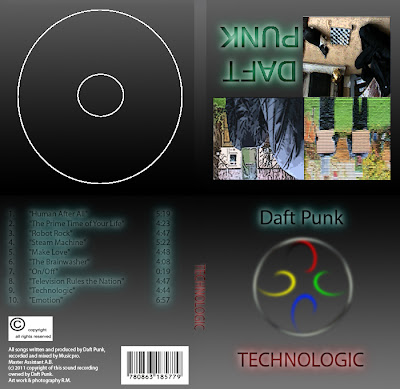
This is the finished digipak, with both the interior and the exterior sections stitched together. This creates a realistic looking digipak, that reflects conventions of the music industry. It also reflects similar conventions of Daft Punk album covers, as some of their albums have contained ambiguous symbols, or images with various effect filters added to them.
Monday, 12 December 2011
Digipak and advert drafts
Front cover of the Digipak

Back cover of the Digipak


Back and front of Digipak, including the spine


Advert first draft

Interior of the digipak

Final draft of the advert

Monday, 31 October 2011
Rough Cut
Negatives
-Lip synch out of time. - Fixed
-Words are not in time. - Fixed
-Cuts need to be more on the beat.
-Confused by the pace of the editing, couldn't read the words in time. -Taken into consideration, for further editing we will slow down the pace of the cuts.
Positives
-Good variety of camera angles.
-Outfits are very good.
Thursday, 20 October 2011
Recce Shots - Costumes

This is the base for the helmets. We drew on two small lines to mark where we thought the eyes would be.

Once we were certain that the lines were in the right place, we cut out a rectangular shape. This would function as the area that allows us to see out of the box.

We then coated the top of the box in kitchen foil. It was held in place with glue. We tried to make sure that there were no pockets of air caught underneath.

To cover the remaining sides, we cut a longer piece of foil, and wrapped it around the box, gluing it down as we went. One this was done, we folded the edges of the foil inside the box and glued them down.

This is the finished product.
Tuesday, 18 October 2011
Monday, 17 October 2011


Friday, 14 October 2011
Thursday, 13 October 2011

Friday, 30 September 2011
Tuesday, 27 September 2011
Daft Punk - Technologic lyric breakdown.
Green = Time the line starts.
Orange = Duration of the line.
Red = Time the line ends.
(0:09) Trash it, change it, mail - upgrade it, (0:10) (1 second)
(0:11) Charge it, pawn it, zoom it, press it, (0:12) (1 second)
(0:12) Snap it, work it, quick - erase it, (0:14) (2 seconds)
(0:14) Write it, cut it, paste it, save it, (0:16) (2 seconds)
(0:16) Load it, check it, quick - rewrite it, (0:18) (2 seconds)
(0:18) Plug it, play it, burn it, rip it, (0:20) (2 seconds)
(0:20) Drag and drop it, zip - unzip it, (0:22) (2 seconds)
(0:22) Lock it, fill it, call it, find it, (0:24) (2 seconds)
(0:24) View it, code it, jam - unlock it, (0:26) (2 seconds)
(0:26) Surf it, scroll it, pause it, click it, (0:27) (1 second)
(0:28) Cross it, crack it, switch - update it, (0:29) (1 second)
(0:29) Name it, rate it, tune it, print it, (0:31) (2 seconds)
(0:31) Scan it, send it, fax - rename it, (0:33) (2 seconds)
(0:33) Touch it, bring it, Pay it, watch it, (0:35) (2 seconds)
(0:35) Turn it, leave it, start - format it. (0:37) (2 seconds)
(0:38) Technologic [4x] (0:44) (6 seconds)
(0:44) Buy it, use it, break it, fix it, (0:46) (2 seconds)
(0:46) Trash it, change it, mail - upgrade it, (0:48) (2 seconds)
(0:48) Charge it, pawn it, zoom it, press it, (0:50) (2 seconds)
(0:50) Snap it, work it, quick - erase it, (0:52) (2 seconds)
(0:52) Write it, cut it, paste it, save it, (0:54) (2 seconds)
(0:54) Load it, check it, quick - rewrite it, (0:56) (2 seconds)
(0:56) Plug it, play it, burn it, rip it, (0:58) (2 seconds)
(0:58) Drag and drop it, zip - unzip it, (1:00) (2 seconds)
(1:00) Lock it, fill it, call it, find it, (1:01) (1 second)
(1:01) View it, code it, jam - unlock it, (1:03) (2 seconds)
(1:03) Surf it, scroll it, pause it, click it, (1:05) (2 seconds)
(1:05) Cross it, crack it, switch - update it, (1:07) (2 seconds)
(1:07) Name it, rate it, tune it, print it, (1:09) (2 seconds)
(1:09) Scan it, send it, fax - rename it (1:11) (2 seconds)
(1:11) Touch it, bring it, pay it, watch it, (1:13) (2 seconds)
(1:13) Turn it, leave it, start - format it. (1:14) (1 second)
(1:15) Buy it, use it, break it, fix it, (1:16) (1 second)
(1:16) Trash it, change it, mail - upgrade it, (1:18) (2 seconds)
(1:18) Charge it, pawn it, zoom it, press it, (1:20) (2 seconds)
(1:20) Snap it, work it, quick - erase it, (1:22) (2 seconds)
(1:22) Write it, cut it, paste it, save it, (1:24) (2 seconds)
(1:24) Load it, check it, quick - rewrite it, (1:26) (2 seconds)
(1:26) Plug it, play it, burn it, rip it, (1:28) (2 seconds)
(1:28) Drag and drop it, zip - unzip it (1:29) (1 second)
(1:30) Touch it, bring it, pay it, watch it, (1:31) (1 second)
(1:32) Turn it, leave it, start - format it. (1:33) (1 second)
(1:37) Touch it, scroll it, pause it, click it, (1:39) (2 seconds)
(1:39) Cross it, crack it, switch, update it. (1:41) (2 seconds)
(1:45) Surf it, scroll it, pause it, click it, (1:46) (1 second)
(1:47) Cross it, crack it, switch-update it. (1:48) (1 second)
(1:48) Name it, rate it, tune it, print it, (1:50) (2 seconds)
(1:50) Scan it, send it, fax-rename it. (1:52) (2 seconds)
(1:52) Touch it, bring it, pay-watch it, (1:54) (2 seconds)
(1:54) Turn it, leave it, start-format it. (1:56) (2 seconds)
(1:56) Buy it, use it, break it, fix it, (1:58) (2 seconds)
(1:58) Trash it, change it, mail - upgrade it, (2:00) (2 seconds)
(2:00) Charge it, pawn it, zoom it, press it, (2:02) (2 seconds)
(2:02) Snap it, work it, quick - erase it, (2:03) (1 second)
(2:03) Write it, cut it, paste it, save it, (2:05) (2 seconds)
(2:06) Load it, check it, quick - rewrite it, (2:07) (1 second)
(2:07) Plug it, play it, burn it, rip it, (2:09) (2 seconds)
(2:09) Drag and drop it, zip - unzip it, (2:11) (2 seconds)
(2:11) Surf it, scroll it, pause it, click it, (2:13) (2 seconds)
(2:13) Cross it, crack it, switch-update it. (2:15) (2 seconds)
(2:15) Name it, rate it, tune it, print it, (2:17) (2 seconds)
(2:17) Scan it, send it, fax-rename it. (2:18) (1 second)
(2:19) Touch it, bring it, pay-watch it, (2:20) (1 second)
(2:20) Turn it, leave it, start-format it. (2:22) (2 seconds)
(2:22) Buy it, use it, break it, fix it, (2:24) (2 seconds)
(2:24) Trash it, change it, mail - upgrade it, (2:26) (2 seconds)
(2:26) Charge it, pawn it, zoom it, press it, (2:28) (2 seconds)
(2:28) Snap it, work it, quick - erase it, (2:30) (2 seconds)
(2:30) Write it, cut it, paste it, save it, (2:32) (2 seconds)
(2:32) Load it, check it, quick - rewrite it, (2:34) (2 seconds)
(2:34) Plug it, play it, burn it, rip it, (2:35) (1 second)
(2:36) Drag and drop it, zip - unzip it, (2:37) (1 second)
(2:37) Surf it, scroll it, pause it, click it, (2:39) (2 seconds)
(2:40) Cross it, crack it, switch-update it. (2:41) (1 second)
(2:41) Name it, rate it, tune it, print it, (2:43) (2 seconds)
(2:43) Scan it, send it, fax-rename it. (2:45) (2 seconds)
(2:46) Technologic X4 (2:53) (7 seconds)
Monday, 26 September 2011
Friday, 23 September 2011
Thursday, 22 September 2011
Subscribe to:
Posts (Atom)